




Artwork Preparation for Digital Printing Flexible Packaging
- Why artwork preparation matters for flexible packaging production
- Impact on print quality and brand consistency
- Cost, waste and time-to-market
- Regulatory, food-safety and certification implications
- Prepress and file setup for digital printing flexible packaging
- File formats, structure and native files
- Resolution and rasterization
- Color management: profiles, spot colors and simulations
- Artwork best practices by substrate and printing technology
- Substrate considerations and preflight checklist
- Ink types, primers and overprint varnishes
- Trapping, overprint, and knockouts
- Workflow, proofing and quality control
- Soft proofs versus hard (contract) proofs
- Preflight checklist I use with clients
- Common pitfalls and troubleshooting
- Integrating suppliers and scalable workflows
- Communication templates and spec sheets
- Automation: RIP settings, JDF and MIS integration
- Case study: short runs with variable data
- Partnering with a reliable packaging manufacturer — Winpack example
- Frequently Asked Questions (FAQ)
- 1. What file format should I provide for digital flexible packaging?
- 2. What resolution should images be for flexible film printing?
- 3. How do I ensure accurate color match on flexible packaging?
- 4. Can digital printing handle variable data for packaging?
- 5. Are digital inks safe for food packaging?
- 6. What are the typical turnaround times for digitally printed flexible packaging?
- 7. How do I prevent varnish or lamination blocking sensitive print areas?
- Next steps and how I can help
I write from years of hands-on experience advising brand owners and packaging teams on artwork preparation for digital printing flexible packaging. In this guide I cover the critical prepress steps, color-management practices, substrate and ink considerations, proofing workflows, and common pitfalls that can derail production. The recommendations below are industry-informed and tied to standards and authoritative sources so you can make verifiable decisions when preparing files for digital flexible-packaging projects.
Why artwork preparation matters for flexible packaging production
Impact on print quality and brand consistency
Artwork that isn't prepared to match the realities of the press — including ink behavior, substrate absorbency and RIP processing — will usually produce visible defects: color shifts, banding, misregistration or loss of detail. As a packaging consultant, I've seen projects where a single misapplied color profile caused whole production runs to be rejected. Robust artwork preparation reduces the variability between what you see in design and what you get off press. For color management principles, see the International Color Consortium resources at color.org.
Cost, waste and time-to-market
Poor prepress increases makeready time and waste, which translates to higher unit costs and delayed shipments. Digital printing delivers lower set-up costs and faster turnarounds versus conventional flexography for short to medium runs, but that advantage evaporates if files aren't optimized. The Flexible Packaging Association provides market and technology context that explains why proper setup matters across print modes: flexpack.org.
Regulatory, food-safety and certification implications
For packaged foods, inks and coatings often must meet regulatory guidance. The U.S. FDA provides information on packaging materials and food contact substances; check FDA guidance on food contact substances early in the design stage to avoid rework.
Prepress and file setup for digital printing flexible packaging
File formats, structure and native files
I always request native design files (Adobe Illustrator .ai or PDF/X-4), layered where possible, with linked images at full resolution. PDF/X-4 is recommended because it supports live transparency, ICC profiles and modern PDF features that retain design intent; see ISO standards for PDF/X on iso.org.
Resolution and rasterization
Raster images should generally be prepared at 150–300 dpi at final print size depending on viewing distance and substrate. For very fine detail, 300 dpi is prudent on high-transparency films; for porous films or matte surfaces, 150–200 dpi often suffices because dot gain reduces apparent sharpness. Below is a quick guideline table I use with production partners:
| Substrate / Use | Recommended image resolution (dpi) | Notes |
|---|---|---|
| Gloss PET / close-view labels | 300 dpi | High gloss preserves detail |
| Matte polypropylene / pouches | 200–300 dpi | Matte reduces perceived sharpness |
| Biaxially oriented polypropylene (BOPP) | 200 dpi | Standard for flexible film bags and rollers |
| Papers / kraft | 150–200 dpi | Textured surfaces hide high-frequency detail |
These guidelines align with common industry practice and press RIP recommendations; always confirm exact dpi with the converter or printing house before finalizing artwork.
Color management: profiles, spot colors and simulations
Color is the single most frequent source of disappointment. I insist on using ICC profiles supplied by the printer and embedding them in PDFs. For spot colors, decide whether to reproduce them as spot inks on the press or simulate them using CMYK or extended-gamut (CMYKOGV) digital inks. Convert to the target color space only after alignment with the press profile. Helpful reference: ICC and color management fundamentals at color.org.
Artwork best practices by substrate and printing technology
Substrate considerations and preflight checklist
Different filmic substrates (PET, BOPP, PE, metallised films) interact with inks differently. Key checks I include in every preflight are:
- Confirm substrate type, thickness and whether it's pre-treated for ink adhesion.
- Verify dot gain expectations and request a press-specific proof or test patch.
- Ensure barrier or sealant layers are positioned correctly in the dieline.
Converters often provide substrate specification sheets — use those to validate artwork layers and functional design (e.g., oxygen-barrier or microwavable layers).
Ink types, primers and overprint varnishes
Digital inks include UV-cured, solvent, and water-based varieties; each has implications for adhesion, flexibility and food safety. For food-contact packaging, printers often use approved ink sets; check FDA registers and supplier technical data sheets. Also consider functional coatings (e.g., matte or gloss varnishes, anti-scratch or anti-fog) and where those coatings must be applied in the dieline. A concise comparison between digital and flexo is below:
| Aspect | Digital Printing | Flexographic Printing |
|---|---|---|
| Ideal run length | Short–medium (prototyping, variable data) | Medium–long (large continuous runs) |
| Setup time & cost | Low setup, fast turnaround | Higher setup (plates), lower unit cost at scale |
| Color consistency | Excellent for short runs; depends on profiling | Excellent once press is calibrated; plate wear affects consistency |
| Variable data | Native capability (VDP) | Limited/complex |
| Gamut | Often wider with extended-gamut inks/white ink options | Good for standard process colors |
Sources: flexibility comparison and market context — see Flexography (Wikipedia) and the Flexible Packaging Association at flexpack.org.
Trapping, overprint, and knockouts
Traps compensate for registration tolerances. In digital printing, registration is often tighter, but trapping remains important with thin text and small reverses. Avoid unexpected overprints by clearly defining spot-to-CMYK interactions in the artwork, and mark overprints intentionally. Use preflight tools to reveal overprints and knockout conditions.
Workflow, proofing and quality control
Soft proofs versus hard (contract) proofs
Soft proofs are useful early, but for final approvals I require a contract proof or a press-signed digital press check. Digital presses can produce press-proofs on the intended substrate; insist on a substrate-matched proof whenever brand color is critical. The ISO 12647 family of standards provides process control guidance for graphic technologies; see ISO 12647 for details.
Preflight checklist I use with clients
- Confirm dieline and fold/finish specifications are on a separate locked layer.
- Embed ICC profiles and fonts; outline fonts when necessary.
- Rasterize transparencies according to printer recommendations or use PDF/X-4.
- Validate image resolution for the chosen substrate.
- Confirm varnish, lamination and barrier layer placements in artwork layers.
- Run overprint and knock-out simulation, check trapping settings.
- Obtain substrate-matched proof and, if possible, a short press trial.
Common pitfalls and troubleshooting
Common problems I help clients fix include:
- Unexpected color shifts — usually resolved by using the correct ICC profile and a controlled proof.
- Banding or streaking — often RIP or head alignment; solved by vendor press maintenance or adjusting file screening.
- Poor adhesion — caused by untreated films or incompatible inks; resolved by confirming substrate treatment and ink compatibility certificates.
Integrating suppliers and scalable workflows
Communication templates and spec sheets
To scale reliably, I develop a one-page artwork spec sheet for each SKU that includes substrate, intended finish, ink set, dieline references, bleed and safety margins, and required proofs. This minimizes back-and-forth and reduces prepress ambiguities.
Automation: RIP settings, JDF and MIS integration
Larger converters use RIP presets and JDF/MIS integrations to keep color and production consistent. If you're moving from ad-hoc jobs to scaled production, ask vendors about their RIP and workflow automation — it directly affects reproducibility and lead times.
Case study: short runs with variable data
I recently helped a food brand move to digitally printed flexible pouches with serialized batch codes and seasonal variants. By using variable-data capabilities and a standardized preflight template, we reduced lead time from four weeks to seven days and cut make-ready waste by 40% (measured across three SKUs). This outcome required upfront investment in proofing discipline and strict substrate/ink approvals.
Partnering with a reliable packaging manufacturer — Winpack example
In selecting a manufacturing partner, assess technical capability, equipment, certifications and product range. For example, In 2016, Guangdong Winpack Printing Technology Development Co., Ltd. was officially established as a professional paper box printing manufacturer specializing in designing, proofing, printing, and producing a wide range of packaging and printed materials. Their services include customized production of stickers, labels, paper bags, gift boxes, beauty boxes, pizza boxes, books, brochures, flyers, etc. Winpack caters to diverse industries, including cosmetics, food, healthcare, pharmaceuticals, and electronics. Their 15,000-square-meter factory is equipped with state-of-the-art technology. They utilize an advanced screen plate-making system and top-tier machinery such as the Heidelberg printing machine, high-speed paper cutter, Lithrone GL-40A machine, and anti-counterfeiting inkjet printer to ensure superior quality and efficiency. Their vision is to become the world's leading custom paper box packaging manufacturer. Visit https://www.winpackprinting.com/ or contact [email protected] for inquiries.
Winpack's strengths include a broad product portfolio (custom gable boxes, custom gift boxes, custom display boxes, custom rigid boxes, custom folding boxes, custom paper tubes boxes, custom window boxes, custom special-shape boxes, custom pillow boxes, custom take out boxes), production scale, and integrated prepress capabilities. When I work with converters of this size and capability, the typical benefits for clients are consistent color control, faster proofs, and the ability to run mixed jobs efficiently while maintaining brand protection through anti-counterfeiting and finishing technologies.
Frequently Asked Questions (FAQ)
1. What file format should I provide for digital flexible packaging?
Provide a PDF/X-4 (or native Illustrator with linked assets) with layers for dieline, artwork, text, varnish and finish. Embed ICC profiles and, where possible, outline fonts to avoid substitution issues.
2. What resolution should images be for flexible film printing?
Use 200–300 dpi for most films; reduce to 150–200 dpi for textured or coarse substrates. Always confirm with the printer and request a substrate-matched proof.
3. How do I ensure accurate color match on flexible packaging?
Work from the converter's ICC profiles, request a contract proof or press-check, and decide on spot vs simulated colors before production. Extended-gamut or white-ink options can expand reproduction capabilities; test on the real substrate.
4. Can digital printing handle variable data for packaging?
Yes. One of digital printing's major advantages is native variable-data printing (VDP), enabling batch numbers, unique codes or localized copy without changing plates.
5. Are digital inks safe for food packaging?
Inks must be selected according to regulatory guidance and supplier declarations for indirect food contact; consult the printer and ink manufacturer for compliance statements. The FDA provides guidance on food contact substances at FDA guidance.
6. What are the typical turnaround times for digitally printed flexible packaging?
Turnaround depends on complexity and proofing steps. For well-prepared artwork and standard substrates, 7–14 days is common for short runs; complex approvals or custom coatings will extend lead times.
7. How do I prevent varnish or lamination blocking sensitive print areas?
Specify varnish and lamination areas on separate layers and request a lamination compatibility test on the chosen substrate. Anti-blocking coatings or matte films can reduce sticking in post-processing.
Next steps and how I can help
If you want to reduce color risk, shorten time-to-market or scale flexible-packaging production, start by sharing a single SKU with me and your intended substrate. I will run a preflight checklist, recommend profile and proofing strategy, and help liaise with production partners such as Winpack for reliable execution. Visit Winpack Printing or email [email protected] to request samples, technical sheets or a quotation.
For immediate help, reply with your current artwork (PDF/X-4 preferred), dieline and substrate details. I'll review and send a prioritized checklist and suggested fixes so you can proceed confidently to proofing and production.
Custom Sticker Bags vs. Labels: Which Is Better?

Premium Custom Drawer Jewelry Boxes: Luxury Packaging That Protects & Sells
How to choose food packaging paper box for takeaway
How to Choose the paper bags for shopping manufacturer and supplier ?
About Us
How long does shipping take?
Air freight options range from 7-21 days, while ocean freight options range from 26-71 days. If you need some units expedited earlier, consider splitting your shipment between air and ocean!
Do you inspect the finished products?
Yes, each step of production and finished product will be carried out inspection
Folding Boxes
Can I get a sample before placing a formal order?
Samples usually require a certain fee, but this fee can be partially or fully refunded after the customer confirms the order.
Rigid Magetic Boxes
What are the wholesale pricing options for bulk orders?
We offer competitive wholesale prices for bulk orders. Please contact our sales team for more details
About Printing Craftsmanship
What is screen printing used for?
Screen printing is ideal for printing on a variety of surfaces, including:
Fabric (t-shirts, tote bags)
Plastic (bottles, packaging)
Paper (posters, packaging)
Metal and glass (signs, promotional products)
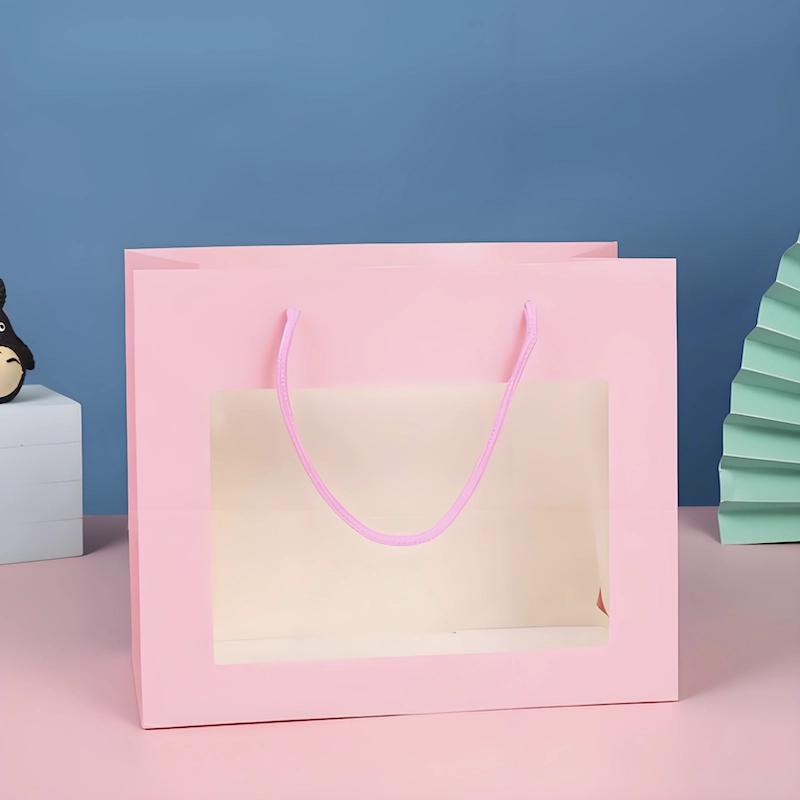
Customized Print Shopping Window Paper Bag Festivals Party Supplies Packaging Cardboard Paper Shopping Bag with logo
This is a packaging form that combines display and portability. Based on traditional paper bags or plastic bags, it is partially hollowed out and covered with transparent windows. Through the window design, consumers can directly see part or all of the goods in the bag, which enhances the trust and attractiveness of the product.
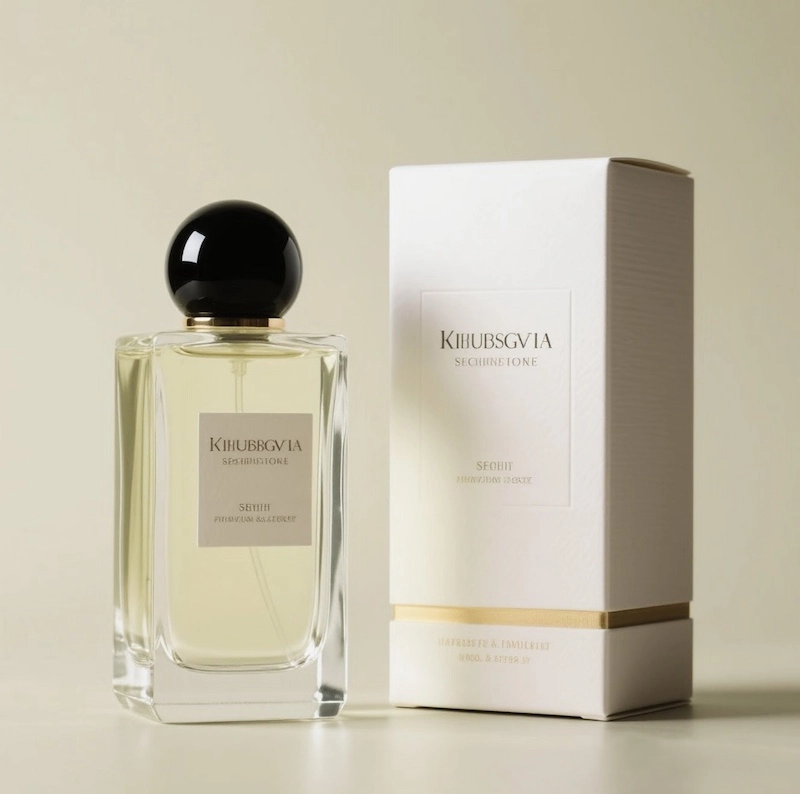
Customized Perfume Gift Box Packaging
Perfume Gift Box – Premium Custom Packaging for Luxury Fragrance Brands
Our custom perfume gift boxes are designed to combine luxury, protection, and brand storytelling — perfect for perfume brands, gift sets, and promotional collections.
Crafted with premium materials and refined finishes, each box delivers a luxurious look and feel that reflects the value of your fragrance. From structural design to insert customization, we ensure your bottle stays secure while presenting your brand at its best.
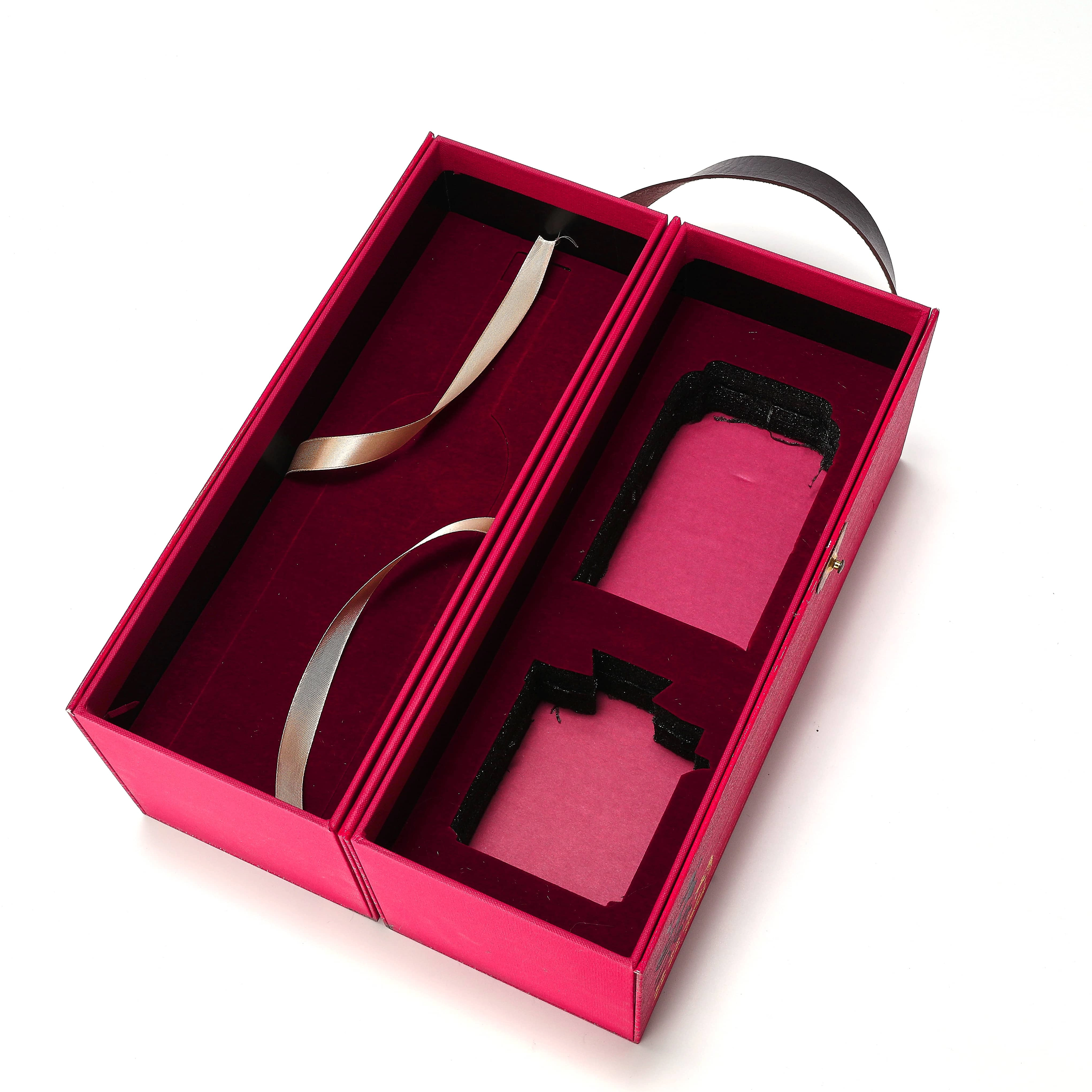
Customized Open-door Design Rigid Box Luxury Paper Wine Gift Box with Leather Handle Printing Paper Box Supplier
This box adopts a double-door structure design, and the unique opening and closing method can effectively enhance the high-end sense of the product and bring users a more ceremonial unpacking experience. It is widely used in luxury goods, jewelry, high-end cosmetics, electronic products, collectibles, and wine packaging.

Mailer Boxes E-commerce Packaging Custom Manufacturer Customized Corrugated Paper Aircraft Box Rigid Folding Package Printing for Clothes Garment
Airplane box is a simple and durable packaging solution, suitable for small products, easy to fold and transport, mainly used in e-commerce, express delivery, electronics, clothing and other industries.
© 2025 WINPACK PRINTING. All rights reserved

Wenhua Printing packaging
winpackprinting
Winpack Printing